
Dual-view dashcams
Road & Cabin Dashcams for More Context When Incidents Occur
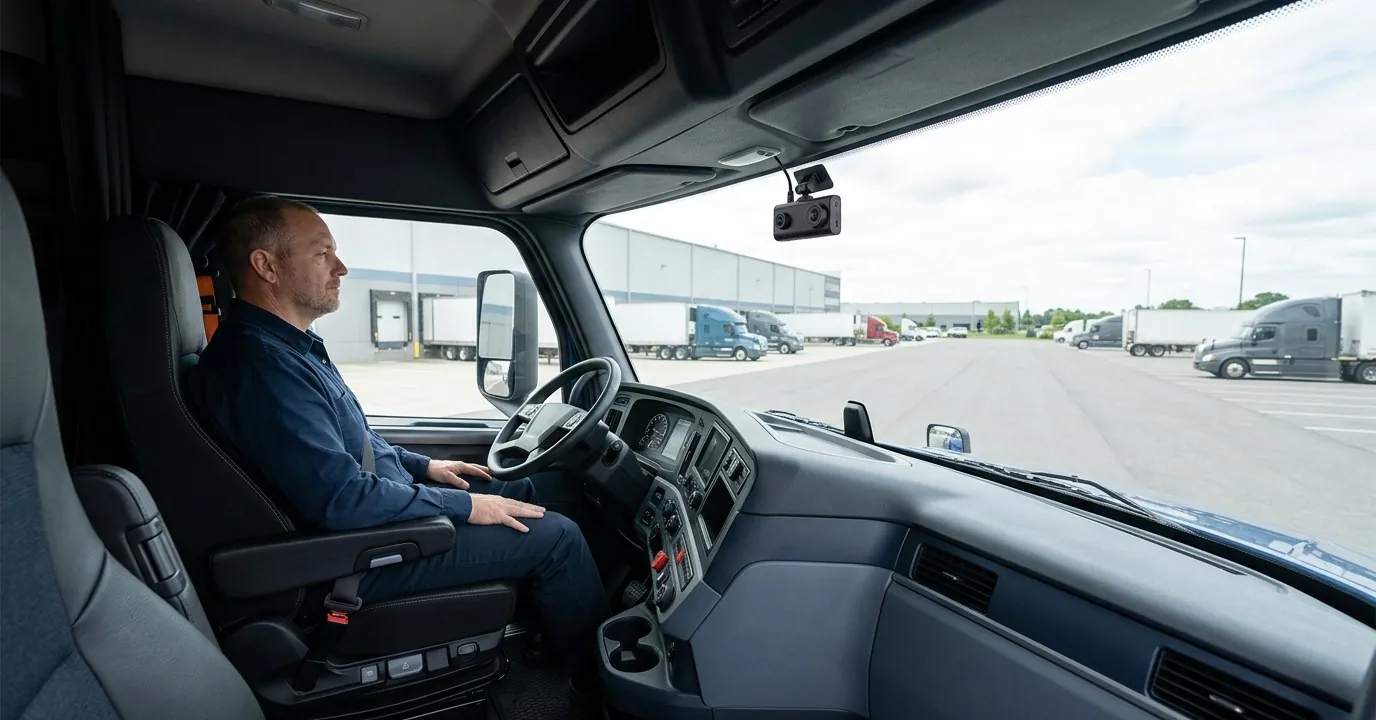
A dual-view camera records what's ahead of the truck and what's happening in the cab, so your team has two perspectives to review instead of one.
2 short steps · no obligation to buy · Written quote within 24 hours
- No long-term contract
- Pause or cancel free
- 0% interest financing available
24/7 support in English & Spanish · Terms apply
Incidents don't wait for a good time. Get your quote before your next load. Get My Dashcam Quote
What fleets say
Read the reviews on GoogleWhy fleets choose it
Road view
Shows traffic, lanes and other vehicles ahead of the truck to help reconstruct an event.
Cabin view
Shows the driver's actions in the cab, which can help support a driver who was attentive and following procedures.
Two angles, one review
Reviewing both perspectives together gives more context than a single view.
How it works
Installation by our technicians
We review your truck model and our technicians install a compact mount that doesn't block the driver's view.
Set your policy
Decide how cabin footage will be used and tell your drivers before the camera goes live.
Review both views
After an incident, review the available road and cabin recordings together.
Free classes at our office
Learn the ELD, the cameras and the app in person, in English or Spanish, with our team.
- Mon–Fri · 2:00 PM
- 10505 NW 112th Ave, Suite 13, Miami, FL 33178
Free, as many times as you need, even before you buy.
Road and cabin views: intended use and a privacy notice
Dual-view cameras work best with clear expectations. What each view is for:
- Road-facing view: documenting traffic and incidents ahead of the truck.
- Cabin-facing view: documenting what happened in the cab during an incident.
- Installation: Top Tracking technicians confirm mounting position, wiring and fit for your truck, then install it.
- Driver notice: inform drivers in writing that a cabin-facing camera is installed and how footage is used.
- Access: limit footage access to people who need it, such as safety staff or your insurer.
Workplace privacy notice: cabin recording may be subject to federal, state and local rules and any agreements with your drivers. Review your policy with a qualified advisor before using cabin-facing cameras.
Get My Dashcam QuoteClear offer terms
Monthly service and financed equipment are separate. Your monthly fee pays for the service; if you finance, those payments follow your agreement with Affirm, Klarna or Afterpay.
0% interest financing availableVia Affirm, Klarna or Afterpay. Subject to approval.
2 months of service free for every year: pay 10 months, get 12.Applies when you finance or prepay a full year of service.
Finance devices, installation and even your monthly service for 1, 2 or 3 years with Affirm, Klarna or Afterpay. Some plans are interest-free. The provider you choose reviews your application and shows the rate, term and any fees before you accept.
- Providers
- Affirm, Klarna or Afterpay
- What you can finance
- Devices, installation and monthly service for 1, 2 or 3 years
- Free months
- 2 months free for each year financed or prepaid (pay 10, get 12)
- Who can apply
- Approval is decided by the provider you choose
- Rate and interest
- Set by the provider; some plans are interest-free
- Term and down payment
- Set by the provider and shown before you accept
- Fees
- Set by the provider and shown before you accept
- If you cancel service
- Cancelling Top Tracking service does not cancel what you owe the financing provider. The equipment stays with you.
0% interest options available through Affirm, Klarna or Afterpay, depending on the provider and plan. Subject to provider approval. Cancelling service does not cancel amounts owed to the provider.
Ask about financingNo long-term service contract. Pause or cancel any service for free.See full terms
Billing is monthly, on the same day you started with us. To pause a truck for a month or cancel a service, write to us before your billing day. There is no charge.
- How to request it
- In writing before your billing day: email info@toptracking.com or text (305) 222-7021
- Billing
- Monthly, on your start date. Adding services later doesn't move that date.
- Pausing
- Not using a truck for a month? Pause its service at no cost.
- Cost to pause or cancel
- Free, as long as we receive your request before the billing day
- Your equipment
- Stays with you, paid in full or financed
- Financed equipment
- Payments owed to Affirm, Klarna or Afterpay continue under your agreement with them
- Coming back
- Reactivation is $95 plus the first month of service
Questions about pausing or cancelling? Call (305) 222-7021 or email info@toptracking.com.
Frequently asked questions
Do I have to record the cabin?
No. Cabin recording is a choice. If you only need the road view, ask about road-facing configurations.
Should I tell my drivers about the cabin camera?
Yes. We recommend a written notice explaining the camera and how footage is used. Requirements vary, so check with a qualified advisor.
Will the camera block the windshield?
It shouldn't. Our technicians install a compact, high mount outside the driver's main line of sight.
How do I get the video?
Both views record continuously, 24/7, to an SD card. Get a clip from the card, the Top Tracking website or the mobile app, or call our 24/7 support and we'll help.
Get My Dashcam Quote
2 short steps · no obligation to buy · Written quote within 24 hours
Prefer to talk? (305) 222-7021 · 24/7 support in English & Spanish